What Should Be Laminated? A Quick Guide to Laminating Documents


Are you looking to preserve and protect your documents? Or enhance their overall colour and shine? Well, it sounds like lamination is a perfect solution for you!  A laminated document provides a professional finish while protecting the document from fingerprints, scratches, liquid and damage. Lamination securely seals your document on four sides creating a professional, high-quality appearance that makes a lasting impression (or should I say document)!

Need an idea of what to laminate? Here’s a list of ideas!

Business

• Awards
• Banners 
• Blueprints
• Brochures
• Business cards
• Catalogue covers
• Certifications
• Charts/graphs
• Displays
• Flip charts
• ID Badges
• List of vendors
• Maps
• Marketing pieces
• Phone lists
• Photos
• Point-of-purchase displays
• Policies and procedures
• Posters
• Pre-printed labels and signs
• Presentation cover sheets
• Price lists
• Sell sheets
• Signs
• Store hours

Education

• Artwork
• Banners
• Bookmarks
• Bulletin aids
• Class schedules
• Classroom aids
• Emergency lists
• Final projects
• Flashcards
• Game boards
• Handouts
• ID Badges
• Maps
• Multiplication tables
• Periodic table
• Photos
• Reading lists
• Safety signs
• Science projects
• Special event posters
• Syllabus
• Wall calendars

Restaurant

•Door signs
• Featured specials
• Help Wanted signs
• Instruction sheets
• Menus
• Drinks instructions
• Featured entrees
• Event posters
• Special offer signs
• Store hour signs
• Table number cards
• Training information

Manufacturing
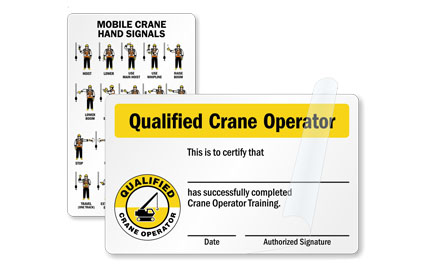
•Equipment instruction labels
• Fire routes
• Protocols 
• Industrial labels
• Operating instructions
• Health and safety posters
• Storage shelf identification
• Warning and caution labels

Crafts

• Artwork
• Babysitter instructions
• Birth certificates
• Bookmarks
• Certificates of achievement
• Craft projects
• Delivery menus
• Diplomas
• Drawings
• Driving maps
• Emergency numbers
• Greeting cards
• Household chore lists
• Household rules
• Luggage Tags
• Magazine articles
• Marriage certificates
• Name tags
• Neighbourhood phone lists
• Newspaper articles
• Photos
• Placemats
• Recipe cards
• Report cards
• Sports schedules


Looking to start laminating your creations? Look no further, We have Dealers across Canada to help! https://canadianworkplacesolutions.ca/locate-a-dealer

The Importance of Employee Recognition


Your employees are the most important asset of your business and deserve recognition. When employees feel they are recognized, they are engaged, they work with passion and feel a profound connection to their company. An engaged team is a successful team.

A recent survey found that Employee recognition has larger impact on engagement, productivity than salary.

The survey, which polled more than 4,200 employees and more than 1,600 human resources leaders, also found 64 per cent of employees would prefer to receive more meaningful recognition as opposed to more frequent recognition. The top three components of meaningful recognition are something specific an employee did, something they valued and the way they made a difference to the person who sent the recognition.

Half (53 per cent) of employees who believe their work isn’t authentically recognized by their employer are actively looking for a new job, compared to 27 per cent who believe their employer’s recognition is authentic, according to a survey by Gallup Inc. for software company Workhuman.

10 employee rewards and recognition ideas 

Not sure how to best show your staff members that you value them? Here are 10 time-tested employee rewards and recognition ideas – whether you’re remote or in the office.  

  1. Celebrate important milestones. Hold a virtual celebration to recognize achievements. Arrange for festive treats to be delivered. 
  2. Put it in writing. Acknowledge employees’ great work in an email or certificate. Copy key executives for more exposure. 
  3. Host regular check-in meetings. Schedule videoconferences or in-person meetings to encourage face-to-face communication and foster connections. 
  4. Highlight successes formally. Cite specific accomplishments during performance reviews, including reinforcing the type of work you want to see. 
  5. Support professional development. Offer tuition assistance for professional courses or certifications. Provide reimbursement for industry association memberships, conferences and publications. 
  6. Give them a call. Reach out to employees regularly to ask how they are doing and to acknowledge their contributions. 
  7. Reward them. Recommend individuals for external and internal accolades and encourage peer nominations. Feature top performers in the company newsletter. 
  8. Give the gift of time. Consult with your HR and legal departments for this one, but given the okay, encourage team members to log off early on Friday and offer additional time off or extra vacation days for jobs well done. 
  9. Develop new leaders. Ask employees to mentor others. Promote from within when possible, and make sure team members know about career growth opportunities in the company. 
  10. Introduce them to management. Invite company executives to join a team meeting or conference call. Arrange for team members to present project results. 

What companies are doing to help retain employees

Image source www.roberthalf.ca


Sources: 

https://www.benefitscanada.com/news/bencan/employee-recognition-has-larger-impact-on-engagement-productivity-than-salary-survey/

https://www.roberthalf.ca/en/blog/management-tips/employee-recognition-key-to-managing-an-anywhere-workforce

https://www.benefitscanada.com/news/bencan/employee-recognition-key-to-retaining-talent-survey/

Typing Tips!


Most, if not all, careers involve some computer-based work and require strong typing skills. Accuracy is equally as important as speed. Some schools have stopped teaching typing altogether, assuming students already possess the skills necessary to be successful in the modern workplace. However, without proper training and practice, many individuals resort to hunt-and-peck typing, or looking down at the keyboard to select the right keys one-by-one. 

The preferred typing method is known as touch-type, or typing without looking at the keyboard. This is much more efficient than hunt-and-peck; the average person types at an average of 40 words per minute, but a person who relies on the touch-type method can exceed 75 words per minute, allowing them to complete their work much more quickly and with minimal errors.

Here are some pointers to improve your own typing skills:

1.) Use the correct starting position

When practicing your typing skills, it’s important to use proper hand placement. To start, keep your fingers positioned over the home row keys (left hand over the A, S, D, and F keys, and the right hand over the J, K, L, and ; keys), with your thumbs hovering over the space bar. From here, you can move your fingers slightly to reach neighboring keys. Your hands should always return this starting position.

2.) Don’t look down your hands

Instead of looking down at your hands, focus on your screen. This can be difficult at first, especially if you have not yet mastered the exact placement of the keys. Looking at the screen will help improve your accuracy because you will be able to catch your typos as they occur. You’ll also begin to memorize the placement of the keys, so you’ll be able to type more quickly as you practice.

3.) Maintain good posture

Sitting in an upright position is going to make it easier to type faster. If you are used to slouching in your chair or working from the couch, try moving to a straight-backed chair or working at your desk.

4.) Find a comfortable position for your hands

The wrong hand placement can make it uncomfortable to type for extended periods of time. The space bar of your keyboard should be centered with your body, so that you are not reading your screen or typing from an angle. As you type, rest your elbows on the table and keep your wrists slightly elevated. You should never bend or angle your wrists dramatically.

5.) Practice!

Nothing is mastered overnight, and in order to really improve your typing accuracy and speed, you need to practice every day. There are many websites that offer free typing skills tests and practice, such as Typing AcademyTypingClub and How To Type. Trust that your speed will improve naturally as you become more familiar with the keyboard.

Tips from: https://www.herzing.edu/blog/5-tips-improving-your-typing-speed-accuracy