Why Should I Shred?
Document shredding is an important process and should be done with proper care and understanding. There are two main reasons why document shredding is essential: to prevent identity theft and to safely dispose of confidential information. There are three basic guidelines to follow when shredding, as seen below.
- Shred all and shred regularly – and avoid the risks of human error or poor judgment about what needs to be shredded. Deter the accumulation of confidential paper waste that is stored in different parts of your office, creating a security risk.
- Shred before recycling – and spare yourself from worrying about what happens to your confidential paper waste once it is at the recycling plant or in transit to the recycling plant.
How Do I Shred?
1. Choose your cut
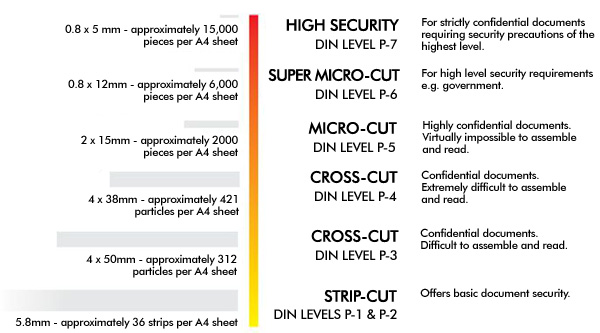
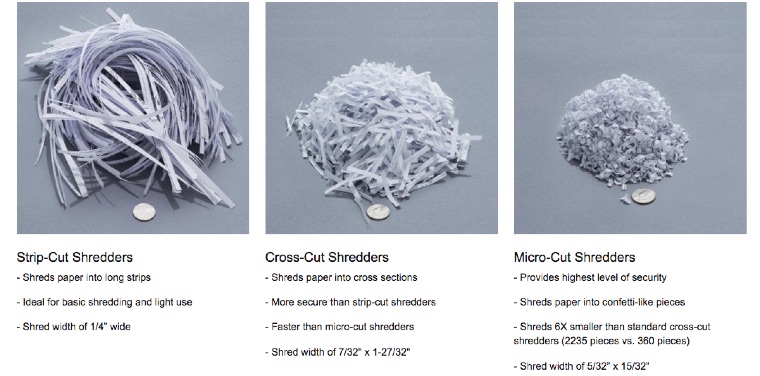
The cut of a shredder refers to what happens when you put paper into the feeder of the machine. There are 6 variations of cuts that you can choose from, depending on the level of security which depends on the sensitivity of the materials you are shredding. Levels of security can be measured in DIN levels. The higher the DIN level, the smaller the cut size thus the better protection. The most common cuts that are used are strip-cut, cross-cut and micro-cut. See the chart below to help choose your cut.
2. Select your ideal sheet capacity
The shredding sheet capacity refers to how many sheets a shredder can intake at one time. The capacity can vary depending on the model. Shredders can take from 5 sheets up to 500. Typically, the more sheets a shredder can handle, the more expensive the model is. If you have stacks of paper you need shredded regularly, or prefer the convenience, it is recommended you choose a shredder that can handle more sheets. Here are some symbols that you will see throughout our catalogue and flyer that will identify the sheet capacity and cut:

Each shredder will identify its sheet capacity. Make sure you choose a shredder that makes the most sense according to how many sheets you think on average you will want to shred at a time.
3. Shredder Features and How They Help
After you choose your core specifications for your new shredder, you can begin to look at added features some shredders provide that could be of good use. Here are some examples:
Paper Jam Features
Some shredders provide Jam Proof Technology, which comes in handy if you will be shredding large amounts of paper at once and need something durable and resilient.

Safety Features
Depending on your security preferences, you can look for the logos below for shredders with added safety features and locks, including a feature that automatically stops your shredder from running when your hands touch the paper opening.
 Energy Saving
Saving energy is always a good idea. Some shredders offer Auto Shut-Off technology so that the shredder doesn’t continue running after you are done using it. Other shredders may offer an Energy Savings System that reduces the amount of energy consumption.

Other Useful Features
There are a few more features shredders provide that could come in handy. If you have used a shredder before, you know the noise they usually make isn’t the most pleasant. This is why some shredders provide silent shredding, which definitely comes in handy at the office. Another useful feature is one that can be found on cross-cut shredders and automatically lubricates the cutters which extents the life of paper shredders. .

4. What Other Materials Will You Need To Shred On A Regular Basis?
The last important criteria to consider when choosing a shredder is what materials in addition to paper may need shredding on a regular basis. Shredders have the capabilities to shred additional materials such as staples, paper clips, credit cards and CD’s. In order to determine what else the machine can shred, make sure you read the description as there will be a list of other uses.

*TIP: How Long Should I Keep Important Documents?
Follow these guidelines to help you determine when to shred sensitive documents:
| Tax Records – Seven years
Pay Stubs – One Year
Bank Statements – One Year
Credit Card Statements – At least 45 Days
Medical Records – At least one year |
Insurance Records – Keep policy information for the life of the policy plus an additional five years
IRA Contributions – Until you withdraw the money
Home Purchase/Sale/Improvements – Until six years after you sell
Warranties – As long as they are current |





 Office Plus Blog