March 31st: World Backup Day! Everything You Need to Know About Data Backup


Happy World Backup Day!

Never heard of it? Don’t worry, you’re probably not alone. World backup day is slowly gaining popularity. There is no surprise of its ever-increasing popularity considering the amount of data that gets lost or corrupted each year. We are sure you’ve lost an important document or file at some point in your life.

Well, fortunately for you we’ve come up with this handy guide on how and why you should regularly backup your data!

What Is Data Backup?

Data backup is the process of making extra copies of all of your important data such as documents, photos and so on and storing them somewhere secure in case the originals ever get lost or damaged. For an even more secure backup, make three copies of your files in case your first two ever malfunction.

Why Should You Backup Your Data?

Everyone should take the time to back up their data because you never really know when your computer could crash, your phone get stolen, or you accidentally delete a file and lose it forever. By creating another copy of all your important data you never have to worry about it getting lost or being destroyed.

Eye-opening facts from worldbackupday.com:

  • 30% of people have never backup up their files!
  • 113 phones are lost or stolen every minute
  • 29% of disasters are caused by accident
  • 1 in 10 computers are infected with viruses each month

How To Backup Your Data?

Backing up your data is neither as hard or time consuming as you may think. But most importantly, it can save you from a lot of stress and heartache in the future if your files are ever compromised. First, you need to decide whether you want to back up your data online or to an external drive. (It is strongly recommended to start backing up to an external drive then make another copy online).

Backing up to an External/USB Drive

You will need: an external hard drive, storage size will depend on the amount of information and data you are backing up. Common options range from 8GB (gigabytes – light storage) to 6TB (terabytes – heavy storage).

Windows

Follow these steps to tell your computer start backing up your work automatically every hour:

  1. Plug your drive or its cable into your USB port.
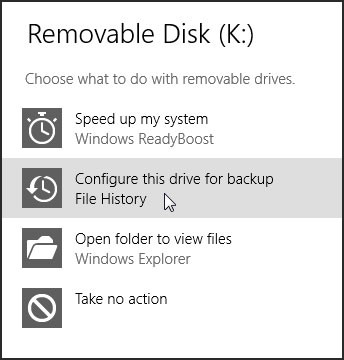
  2. Click the pop-up notification that says, Tap to choose what happens with removable drives.
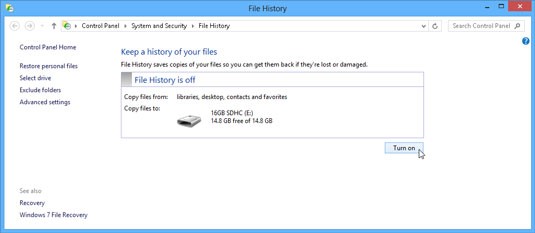
  3. Select the Configure this Drive for Backup option; when the File History window appears, click the Turn On button.Windows Backup Steps
  4. Open the Control Panel.
  5. Select the System and Security category and click File History.
  6. If you need to switch the drive, click the Select Drive link from the window’s left side and select a different drive.
  7. Click the Turn On button.

Mac

  1. Set up Time Machine. (Time Machine is the built-in backup feature of OS X.)
  2. When you connect an external hard drive directly to your Mac, you might be asked if you want to use the drive to back up with Time Machine. Click “Use as Backup Disk.”

If Time Machine doesn’t ask you to choose a backup disk:

  1. Open Time Machine preferences from the Time Machine menu in the menu bar. Or choose Apple menu > System Preferences, then click Time Machine.
  2. Click Select Backup Disk.
  3. Select an external hard drive, Time Capsule, or other storage solution from the list, then click Use Disk.
  4. After you choose a backup disk, optionally click “Add or Remove Backup Disk” to add more backup disks for extra security and convenience.

After you set up Time Machine, it automatically makes hourly backups for the past 24 hours, daily backups for the past month, and weekly backups for all previous months. The oldest backups are deleted when your backup drive is full.

Backing up online

Although you shouldn’t backup your entire hard drive onto a cloud-storage service, you can use these services to preserve your important files. There are a number of different cloud-storage services you can choose from, some free, some paid. A few notable ones to look into include:

  • Google Drive (15GB Free)
  • Dropbox (2GB Free)
  • OneDrive (5GB Free)
  • SugarSync (5GB Free)

Once you’ve signed up for an online storage website, simply start uploading all of your important files. The benefit of storing online is that you can access it from any computer, anytime. You can also easily share and collaborate with others. There are also options to pay for more storage if the amount of free storage offered is not enough.

What You Should Back Up

Ultimately you should backup all of the files that are important to you and that are irreplaceable. If you still don’t know where to start, take a look at the following areas according to a MakeUseOf article:

Personal Files

This will include things you’ve created such as documents and things that you have purchased such as music and movies. So check your Documents, Pictures and Videos folders. Setting it up so that these folders are automatically backed up as a whole rather than picking and choosing files is ideal.

Personal FIles - Backup

Desktop

If you are in the habit of saving all of your projects that you are currently working on onto your desktop, this is another place you should be sure to back up. This way, you don’t have to worry about losing these projects and having to start from scratch and losing valuable time.

Desktop Backup

Browser Data

Don’t forget about all of the bookmarks and favorites in your browsers. Often we collect these over a large amount of time and don’t want to lose these so it’s a good idea to keep a second copy. Additionally, you probably have quite a few extensions and other browser settings you wouldn’t want to manually install once more.

Browser Data Backup

Emails

Backing up e-mails is often overlooked, but it’s a good idea to keep backups of your e-mails for your personal records especially any important business e-mails or receipts.

Email Backup

Avoid Using these Job Interview Answers


During interviews, we all try to tell the potential employer that we are a perfect fit for the position because we work hard and are team players. As great as this sounds, it doesn’t make you stand out from anyone else applying for that position. Here are 5 interview clichés to avoid:

Avoiding Answers at Job Interview

“I’m hard working”

That’s great to know, but the candidate that was just interviewed 20 minutes ago most likely said the exact same thing. Instead of just saying you’re a hard worker, tell the interviewer how you’re a hard worker and give examples of things you have done that prove you to be a hard worker. Stand out from the others by telling the interviewer that you get results.

“I’m a team player”

You aren’t going to say that you don’t work well with others, so potential employers won’t be convinced by this phrase. Instead, let them know of teams you have built and worked with and explain how you contributed in that group. As well, this is a perfect opportunity to slip in a conflict that you were able to resolve within the team.

“I work too hard”

When you’re asked what your weakness is, don’t say that you work too hard. Also, don’t say that you’re a perfectionist either; this is one of the top answers so make up something else. Give the interviewer a real weakness of yours but make sure that it isn’t too incriminating of a weakness. For example, if you’re applying for an accounting position, don’t say you’re bad with numbers; say something like you aren’t very good at speaking up in meetings” and let them know what you are doing to overcome this weakness.

“I’m open to anything”

Don’t tell this to a potential employer. It sounds desperate and employers don’t like that. Instead of saying this, explain why you want this job as opposed to any other job. It shows you are passionate for their company rather than just getting a job.

“I’m perfect for this position”

This is exactly what you want the employer to know, but you can’t say it just like that. Instead, demonstrate how perfect you are for the company with your success stories and show them that you researched both the role and company in depth. Talk about the company and how important the things they do are to you, this is just a fancier way of saying “I will fit in” and will no doubt stand you apart from the rest.

View original article here.

Improve your Work Day with these Beneficial Snacks  


What you decide to eat throughout the day not only impacts your health but also your productivity. It is important to eat well throughout the day so that your body can perform at its highest potential. Eating foods that are high in fat or sugar will result in low energy as high fat foods take more work to digest and high sugar foods will spike the blood stream then crash. Don’t let temptations or a lack of time stop you from eating the nutritional foods your body desires. This article gives advice on which snacks to consume to get the nutrition your body needs.

Healthy snacking at work

Along with eating well, make sure to get plenty of sleep each night as sleep deprivation affects appetite and pushes you to eat twice the amount of calories as you normally would consume in a day.

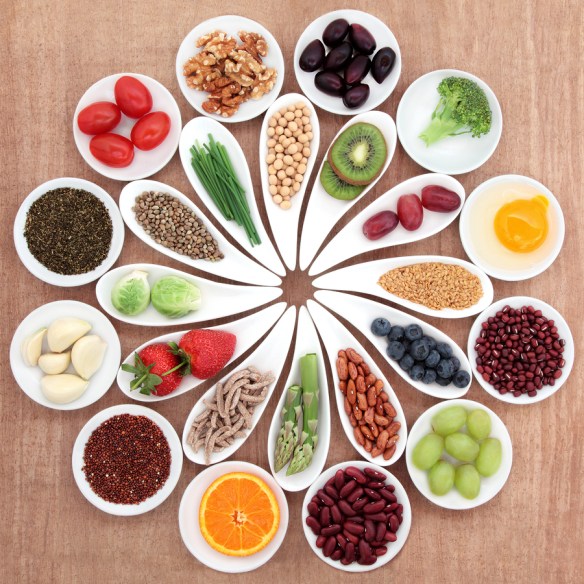
Here are 16 quick, healthy, and inexpensive snacks:

Almonds

Almonds make a satisfying snack that is rich in protein and healthy fats. They contain 9 essential nutrients, have the highest rate of proteins and fiber (3.5g fiber per 23 pieces) compared to other nuts, are rich in Vitamin E (35% daily value in 23 pieces), and contain monounsaturated fats.

Low-Fat Popcorn

As you may not know, popcorn is actually a good source of fiber (8g per 100g) and is a perfect snack to satisfy a craving for something crunchy and salty. Try to get popcorn that is low in fat as high fat foods take time to digest.

Fresh Fruit

Fruits are packed with vitamins and minerals and are a great snack for when you are craving something sweet. Fruits, especially berries, are high in antioxidants which help create a stronger immune system and a better work performance.

Dried Fruit

A less messy option to fresh fruit – dried fruit is high in fiber and potassium which makes them a great snack especially when in the mood for something sweet and chewy. Try dried apricots, apples, bananas, or raisins.

Dry Cereal

Try a cereal like bran flakes that contains a low glycemic index. The brain draws most of its energy from glucose, so by consuming cereals with a low glycemic index, glucose will be slowly released to the bloodstream which will minimize blood sugar swings. Best of all, these foods will increase brainpower and mental focus.

Protein Bar

Try to choose a protein bar that is less than 200 calories and contains fruits and nuts. Make sure to check the labels as many protein bars are high in calories.

Mini Flavoured Rice Cakes

For the times you feel the need to cheat your nutrition, grab some mini flavoured rice cakes. They’re low in calories and come in a variety of different flavours so you can get the satisfaction you’re looking for without paying the consequences.

Pretzels

Aside from the salt, pretzels are low in fat and can give you some carbs to help manage your hunger between meals.

Bananas

One medium sized banana contains the needed amount of glucose by the brain to perform at its best. Frozen bananas are a great substitute to ice cream. If you’re having a sweet tooth moment, drizzle some dark chocolate on the banana to satisfy your craving.

String Cheese or Cottage Cheese

Cheese is a good source of protein which will keep your blood sugar levels steady so that you won’t become tired.

Wasabi Peas

For the people who like spicy, crunchy, and salty – try wasabi peas. They contain fiber and protein which will give you some energy and keep your blood sugars from lowering.

Hard-Boiled Egg

Eggs are a great source of protein and will keep you feeling full for some time. Try to eat your hard-boiled eggs in the kitchen away from your fellow employees as the smell can be offensive.

Vegetables and Hummus

Hummus is a good source of calcium, iron, protein, and fiber and eating it with vegetables is the perfect nutritious snack that is satisfying to both your body and your taste buds.

Tomato Juice

Sometimes when you think you are hungry or crave sugar, you are actually thirsty. Try to defeat this by having a low sodium tomato or vegetable juice.

Yogurt

Yogurt contains probiotics, protein, calcium, vitamins, potassium, magnesium, and good bacteria. Maximize your nutrition and create a delicious snack by adding granola and fresh fruit to the yogurt.

Apples and Peanut Butter

The protein in the peanut butter and the fiber and carbohydrates in the apple will hold you over for a few hours. Satisfy your taste buds with this tasty snack. If you don’t like peanut butter (or are allergic) substitute it for almond butter.